AI Product Design
Personal Project
Enterprise onboarding for Designers, Developers & QA Teams is
fragmented across disconnected systems, workflows, and documentation
— creating cognitive overload and slowing operational readiness.
Onboardr is an AI-powered SaaS web app POC designed to orchestrate
onboarding knowledge, workflows, and organizational context into one
unified, adaptive experience.

Product teams already have the documentation — in Confluence, Figma, Dovetail, Mural, Jira, and more. The problem is that none of it is connected, surfaced at the right moment, or interpreted for the person who needs it. That problem exists for Product Designers navigating workflow maps, Developers mapping service dependencies, and QA Analysts finding test procedures and release workflows. The research and MVP conducted so far focused on Product Designers — establishing a platform architecture and AI interaction model built to extend across all three roles.
3
distinct designer personas researched — each with different onboarding failure modes
7+
enterprise systems the platform connects to and orchestrates across
3
phases — research, prototype testing, and trust calibration + revised build
Live
published responsive web app — desktop + mobile — at onboardr-b2b-saas.lovable.app

The Problem
Designers, Developers, and QA Teams all face the same fragmented, inconsistent onboarding experience.
Enterprise onboarding for Designers, Developers & QA Teams is distributed across disconnected systems, workflows, repositories, and documentation — creating onboarding friction, slowing productivity, and producing inconsistent experiences across teams. Critical knowledge only lives in people's heads, creating repeated interruptions and a tribal knowledge dependency that never gets resolved at the organizational level.
Fragmented Onboarding
No single source of truth — critical information scattered across Confluence, Figma, Mural, Jira, Dovetail, and more with no unified entry point.
Buried Research Artifacts
Dovetail repositories, usability recordings, and interview summaries that exist but are effectively undiscoverable without knowing where to look.
Disconnected Documentation
Docs exist but aren't linked to the workflows or systems they describe — making them difficult to find and impossible to contextualize without help.
Inconsistent Experiences
Onboarding quality varies entirely by team, manager, and project — no standard path means a new designer's ramp-up depends on luck of placement.
Unnavigable Workflow Maps
Large Mural diagrams and enterprise system maps with no guided interpretation — comprehensive for experts, incomprehensible for anyone new.
Tribal Knowledge Dependency
Critical organizational context only lives in people's heads — creating repeated teammate interruptions and a knowledge transfer problem that never gets solved.
The Approach
Research-grounded product design — from pain point synthesis to working prototype.
Onboardr was built through a rigorous product design process anchored in real enterprise onboarding artifacts and user research — shaping every product decision from the AI interaction model to the feature architecture to the MVP prototype built using AI-assisted development tools and Figma.
01
Research & Discovery: I conducted onboarding workflow analysis, enterprise artifact review, onboarding pain point mapping, AI interaction exploration, onboarding task modeling, and interview synthesis. Enterprise artifacts reviewed
included workflow maps, onboarding murals and checklists, Dovetail research repositories and usability recordings, Confluence documentation, Figma organization standards, and discovery artifacts — building a grounded picture of exactly where and how enterprise onboarding breaks down across organizations.
02
Persona Development — Three User Archetypes: Interview findings revealed three distinct personas, each with different onboarding needs, priorities, and failure modes. Rather than designing for a generic new hire, the product was shaped around the specific gaps each persona experiences — from the new graduate overwhelmed by enterprise complexity, to the mid-level professional who understands their job but lacks domain knowledge, to the contractor who needs immediate productivity with minimal onboarding support.
03
Product Concept & AI Design Philosophy: The core design opportunity was framing AI not as a generic chatbot layered onto existing documentation, but as a contextual onboarding intelligence layer embedded directly into the onboarding workflow — orchestrating knowledge, systems, and organizational context rather than just answering questions. This framing drove every feature decision in the product, from the adaptive checklist to the System Explorer to the AI Copilot's proactive guidance behaviors.
04
Iterative Build — Three Prompt Passes in Lovable, Tested & Revised: The prototype was built across three sequential Lovable prompt passes: the initial 5-screen MVP, a full rebrand and screen expansion pass, and a trust and automation update pass applying 10 research-backed changes from the usability testing findings. A fourth pass added a responsive mobile layout and a left slide-out AI panel. The published build at onboardr-b2b- saas.lovable.app reflects all four passes — desktop and mobile, responsive at 768px.
Three personas. Three roles. Three onboarding failure modes.
New Graduate
Needs: Structured guidance · Clear starting point
P A I N P O I N T S
→ Overwhelmed by enterprise complexity and tool sprawl
→ Unsure where to begin or what to prioritize
→ Unfamiliar with enterprise systems and workflows
→ Unclear on organizational expectations and what good looks like
Mid-Level / New Domain
Role: Mid-Level / New Domain · Needs: Systems context
P A I N P O I N T S
→ Understands UX — but lacks business and domain knowledge
→ Struggles to interpret system relationships and dependencies
→ Difficulty locating existing documentation and research
→ Needs workflow context, not just access to diagramslooks like
Contractor
Needs: Immediate productivity · Self-serve path
P A I N P O I N T S
→ Needs to be productive from day one with limited ramp time
→ Minimal onboarding support available in contract contexts
→ Requires compressed onboarding that gets to the right things fast
→ Cannot rely on tribal knowledge — needs a fully self-serve path
Nine core features — one adaptive onboarding web app
Personalized Onboarding Path: AI generates a custom onboarding sequence based on role, team, and self-
identified knowledge gaps.
Adaptive Onboarding Checklist: Dynamic checklist that reorders itself based on progress, dependencies, and
AI-detected priorities.
System Explorer: Interactive enterprise system and workflow map with AI-generated
explanations of dependencies and team relationships.
Artifacts & Documentation Hub: Surfaces Dovetail repositories, Confluence docs, Figma files, and discovery
artifacts relevant to what the designer is working on now.
Workflow Explorer: Step-by-step breakdown of enterprise processes with dependency highlights
and decision point guidance.
People & Teams Directory: Stakeholder map with contextual info on team structures, roles, and the right
people to contact for each workflow area.
Tools & Access Management: Guides setup across Figma, Dovetail, Jira, Confluence, Productboard, and
design systems — with handoff standards and naming conventions.
AI Copilot Guidance: Persistent AI panel providing contextual nudges, surfacing unseen resources,
and proactively recommending next steps based on current progress.
Progress Tracking & Recommendations: Onboarding progress visualization with AI-generated recommendations that
optimize the path based on gaps identified over time.
The Solution
Onboardr — an AI-powered SaaS web app POC that orchestrates enterprise onboarding into one adaptive, intelligent experience.
Onboardr centralizes everything a new designer needs — systems, workflows, documentation, research, stakeholders, tools, and design operations standards — into a single adaptive web app. An AI Copilot embedded throughout the experience surfaces the right knowledge at the right moment, based on the designer's role, team, and current onboarding progress — not in response to a blank prompt. The core design decision was treating AI as a contextual intelligence layer embedded inside the onboarding workflow — not a chatbot bolted on top of existing documentation. The result is an experience that adapts to each designer's gaps, generates personalized onboarding sequences, and proactively surfaces resources before the designer knows they need them.
Personalized Onboarding Path
AI generates a custom onboarding sequence based on role, team, and self-identified gaps — replacing the one-size-fits-all approach with an adaptive journey.
AI Copilot — Embedded Intelligence
Persistent AI panel providing contextual nudges and proactive resource surfacing — aware of where the designer is and what they haven't reviewed yet.
System Explorer
Interactive enterprise workflow map with AI-generated explanations of dependencies, team relationships, and operational processes.
Artifacts & Docs Hub
Surfaces Dovetail repositories, Confluence docs, Figma files, and discovery artifacts contextually — based on what the designer is working on now.
Adaptive Onboarding Checklist
Dynamic checklist that reorders itself based on progress, dependencies, and AI-detected priorities — not a static list of tasks.
People, Teams & Tools
Stakeholder directory, team structure map, and guided tool setup across Figma, Dovetail, Jira, Confluence, and Productboard — all in one place.
Validation — Comparative User Testing
Two prototypes, two users, two methods — testing both look-and- feel and the core concept.
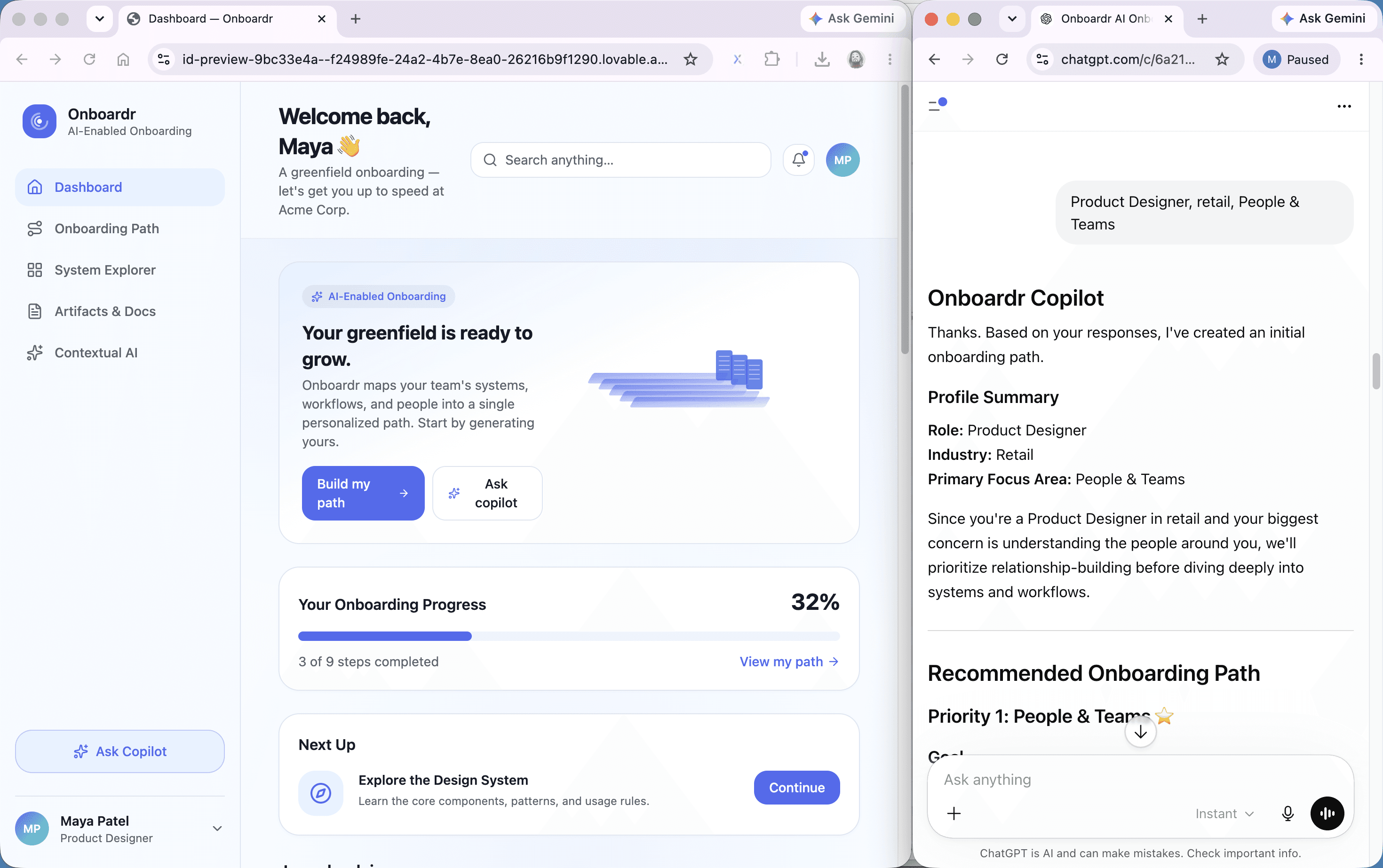
I tested two prototypes with two Product Designer participants, randomizing order to reduce sequencing bias: a high-fidelity Lovable build and a Wizard of Oz ChatGPT prototype simulating the AI Copilot. While Onboardr is built for Designers, Developers, and QA Teams globally, this testing round focused on Product Designers as the MVP persona — establishing a validated foundation before expanding testing to Developer and QA Team participants in future cycles.
PROTOTYPE A — HI-FI (LOVABLE) · STRUCTURAL FEEDBACK
— Live 5-screen published web app with real navigation and components
— Users praised visual polish - "looks like a real product I'd use at a job"
— Prompt chips were the highest-rated feature - "I didn't know what to ask"
— Surfaced interface fixes: drag affordances, clearer nav labels, source attribution

PROTOTYPE B — WIZARD OF OZ · CONCEPTUAL FEEDBACK
— Chat-only prototype — no visual interface, prompt-primed AI Copilot
— Users engaged the core value proposition immediately — deeper, richer feedback
— Surfaced the single most valuable insight — the path output must be saveable
— Revealed unarticulated needs the polished UI alone never would have surfaced
AI must always cite reasoning tied to context.
Both participants rejected generic output instantly and trusted the AI the moment it explained why — each independently asked to trace recommendations back to a real source.
The path output must be saveable and shareable.
The defining insight of the study, surfaced in a Wizard of Oz session — "Can I copy this somewhere? I'd actually use this as my real onboarding plan.
Onboarding must handle the blank slate.
A participant articulated the core pain point unprompted — "I don't know what my responsibilities are yet" — the intake flow needs a path for users who can't answer role questions from the start.
Trust Calibration & Revised Build
Three variant designs, ten research-backed changes, and a published responsive product.
I tested two prototypes with two Product Designer participants, randomizing order to reduce sequencing bias: a high-fidelity Lovable build and a Wizard of Oz ChatGPT prototype simulating the AI Copilot. While Onboardr is built for Designers, Developers, and QA Teams globally, this testing round focused on Product Designers as the MVP persona — establishing a validated foundation before expanding testing to Developer and QA Team participants in future cycles.

VARIANT A: Verifier + Source Attribution
Low automation, high transparency. System observes and flags — never acts. Three-option check-in gallery. Best for first-time enterprise users building initial trust.

VARIANT B: Mixed-Initiative + Confidence Tiers
Adaptive automation with visible decision logic. Three confidence tiers — high acts, medium surfaces soft check-in, low stays silent. Every action includes rationale and undo.

VARIANT C: Design Gallery — Maximum User Control
AI presents six support modes; user selects before AI acts. Generated paths saveable, exportable, shareable. Best for established sessions once trust is built.
Best Bet Recommendation
Hybrid of Variant A + C — Verifier trigger, Design Gallery response layer.
The Verifier fires only when behavioral confidence is high — minimizing the "Clippy failure mode" where the system speaks
without something meaningful to say. When it fires, the Design Gallery surfaces options rather than prescribing a single
response. Variant B's confidence tiers are recommended for returning users in Session 3+, once the AI has an established
behavioral track record. This maps to Shneiderman's agency-plus-automation quadrant: high user control, calibrated automation.

Onboarding Dashboard
Personalized onboarding path with progress tracking and session resume
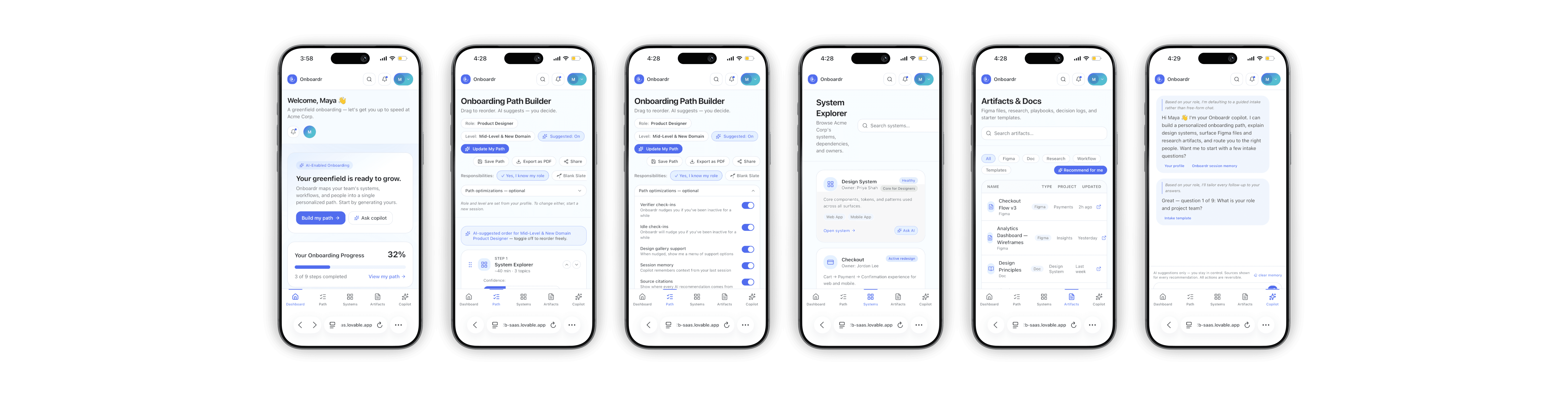
Live MVP Web App — Selected Screens

Returning User Sign In
Name and PIN login to resume onboarding progress across sessions
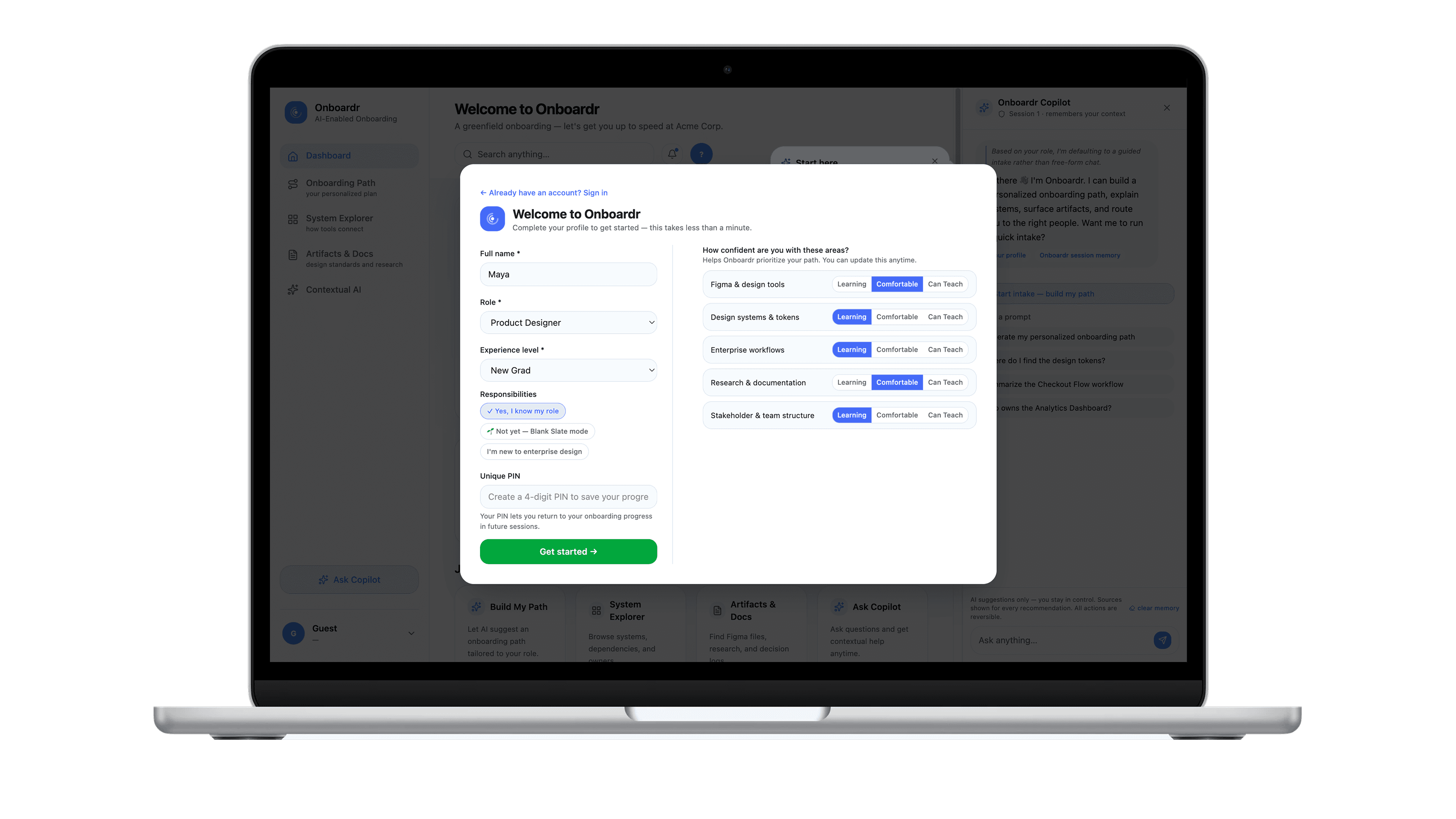
Onboarding Intake — New User Setup
Role, experience level, and confidence self-assessment on first login

Onboarding Path Builder
Customizable learning path with AI suggestions and adaptive check-ins

System Explorer
Workflow map with AI interpretation, contextual nudges, & resource surfacing

Design Gallery
AI presents six support modes; user selects before AI acts. Generated paths saveable, exportable, shareable. Best for established sessions
once trust is built.
The Impact
A concept that proved AI's strongest value in enterprise is context — not just capability.
Onboardr demonstrated that the enterprise onboarding problem is fundamentally a knowledge orchestration problem — and that AI, when embedded deliberately into workflows rather than added as a standalone tool, can meaningfully reduce cognitive overload, accelerate operational readiness, and produce consistent onboarding experiences regardless of team, manager, or project.
Adaptive onboarding resonated across all three personas
The personalized path concept — AI generating a custom onboarding sequence based on role, team, and self-identified gaps — addressed the core failure of one-size-fits-all enterprise onboarding without requiring organizations to maintain separate documentation tracks per persona type.
Contextual AI creates more value than generic prompting
The most important design insight from this project: AI that knows where you are in a workflow is exponentially more useful than AI that waits to be asked. The Copilot's proactive behavior — surfacing recordings before a designer edits a flow — modeled what embedded intelligence actually looks like in practice.
Onboarding is a knowledge orchestration problem
The documentation already exists in most enterprise organizations. The problem is that it's not connected, not surfaced at the right moment, and not interpreted for the person who needs it. Onboardr reframes onboarding as a connection and orchestration challenge — not a content one.
AI-assisted prototyping is a design competency
Using ChatGPT for concept and content strategy and Lovable for prototype scaffolding — then refining in Figma — compressed the build timeline dramatically. The capstone became a live demonstration of AI-augmented product design as a workflow, not just a subject area.