UX Research
UI / UX Design
HyperThought® is a Google Drive analog for the Science, Technology, and Research domains — enabling researchers at government labs, universities, and defense organizations to manage large datasets, create workspaces, and transfer files. I was brought in to conduct user research, understand how people were actually using the platform, and design the features that would deepen trust and strengthen long-term adoption.

Empathy before design — understanding how users worked before deciding what to build.
HyperThought had a loyal user base who understood its value. Rather than assuming what needed to change, the mandate was to go into the field — observing, listening, and immersing alongside the people who used the platform every day. What emerged wasn't a list of feature requests. It was a clear picture of where the experience was creating friction, eroding confidence, and getting in the way of the work users needed to do. The design solutions followed directly from that understanding.
↑
HyperThought net-new
features successfully
implemented in recent
releases
2
New feature solutions
designed — File
Copy/Paste and File
Undo/Redo — both
shipped
3
Ethnographic
methodologies —
Observation, Immersion,
and one-on-one Interviews
7
High-level research
questions structuring
discovery and analysis
The Problem
Understanding how users worked — and where the experience was getting in their way.
HyperThought is not a public consumer platform. It is deployed for specific organizations — research programs, government labs, universities, and Air Force units — through organization-specific instances. That deployment model meant user feedback didn't surface organically. The only way to understand what was actually happening was to go into the field and listen.
What users were experiencing
What this meant for adoption
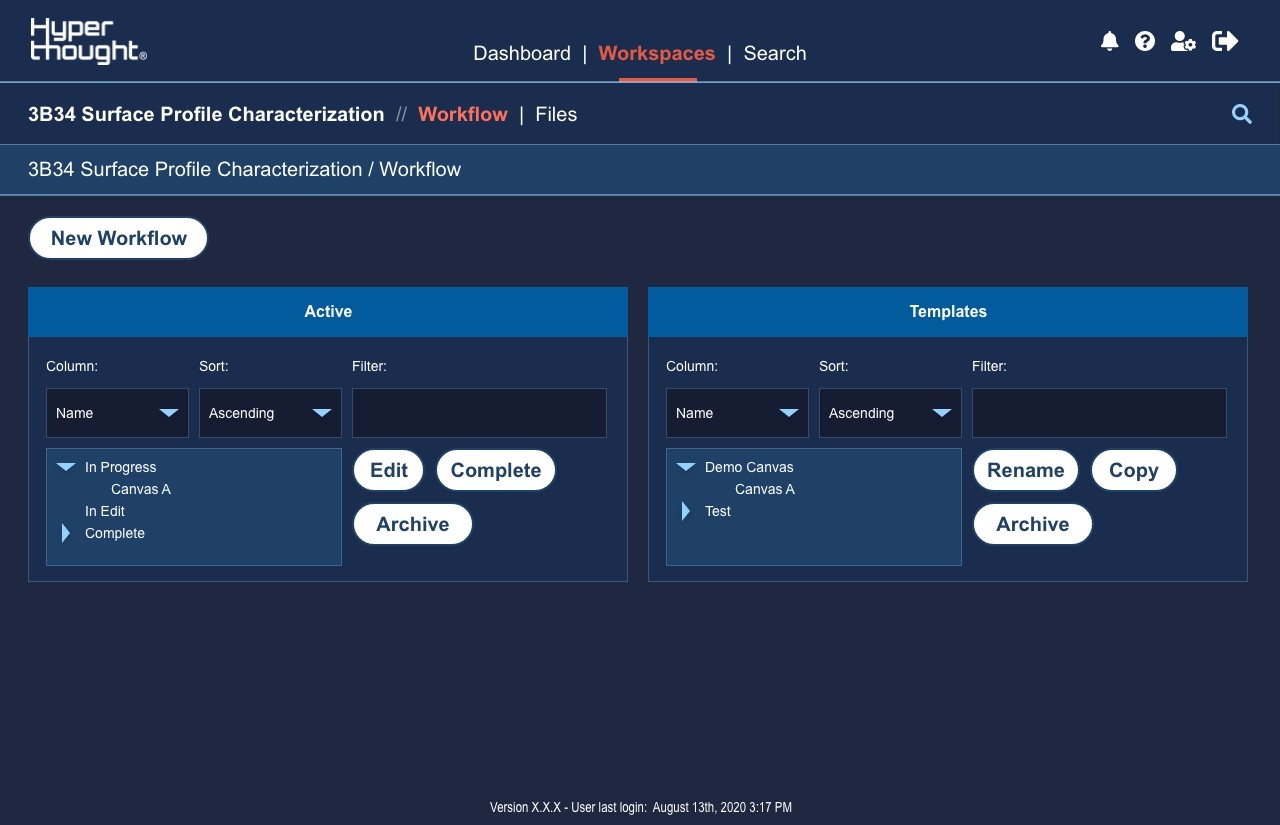
The Workspaces Tab before the new features were added
The Approach
Ethnographic research — then evidence-based design from the findings up.
Partnered with a Senior Analyst, I executed a structured ethnographic research study embedded directly in the user environment — observing, immersing, and interviewing to understand the real texture of how people used HyperThought day to day. The research plan was verified with the project group and stakeholders to ensure consistent methods and questions were applied across all participant groups, making findings comparable and actionable rather than anecdotal.
01
Research Planning & Question Development: Partnered with a Senior Analyst to draft seven high-level research questions covering familiarity, experience quality, daily workflow impact, improvement areas. The research plan was verified with the project group and stakeholders to ensure consistent methods across all participant groups.
02
Ethnographic Research: Employed three complementary methodologies: Observation (Known Observer method — understanding team activities without influencing behavior), Immersion (embedding side-by-side with users to experience
the real constraints of their environment), and one-on-one Interviews (to go deeper into specific pain
points and areas of opportunity). Primary participants were researchers and developers actively using
HyperThought.
03
Participant Recruitment & Bias Prevention: Recruited 10 stakeholders and active users across government labs (AFRL, Navy), universities (Georgia Tech, Mines, UTEP, Purdue), and defense contractors. Interview design actively prevented leading questions and confirmation bias — methodological rigor that made findings actionable rather than anecdotal.
04
Analysis & Synthesis: Findings were transcribed into a Confluence page, cataloging individual responses from each participant across all interviews. Grouped findings into logical categories and sub-categories, elevating the most
consistent and impactful patterns into high-level findings — each paired with specific, prioritized
recommendations for the product and deployment teams.
05
Design Response — Two Feature Solutions: Research findings directly shaped the design work. Developed two solutions addressing the highest-impact file management friction points, delivering visual design (icon designs and final UI
mockups), interaction design (UX flows and activity diagrams), and UAT test cases for each feature — ensuring every solution could be verified against business rules before release.
A Confluence page containing the UAT feedback for the Bucket Lite Feature in Hyperthought

Key Finding & Recommendation
Positive sentiment masking real friction — file management was the breaking point.
Users understood the vision and power HyperThought could provide. Empathy with their day-to-day experience revealed that file organization and data management friction — not capability gaps — were creating the most significant barriers. A misplaced file is a small issue. But when combined with difficulties copying multiple files to workspaces or workflows, those small issues became problems many users didn't feel equipped to recover from. Ensuring the first use is seamless — and that errors are recoverable — was identified as critical to building the trust needed for sustained adoption.
Recommendation:
Continued collaboration and communication with users will help identify problems, prioritize, and implement solutions. In the near-term, focus on known file management and file organization friction to ensure a smooth, continued deployment. Log enhancements to resolve pain points systematically rather than reactively.
Interaction Flow Diagrams

Solution 1 — File Copy/Paste
New interaction model matching user mental model

Solution 2 — File Undo/Redo
Recovery capability for all file toolbar actions
The Solution
Two feature solutions — designed directly from what users told us they needed.
Developed two solutions for the file management and file organization friction points — each delivered with visual design, interaction flows, and UAT test cases for engineering handoff. Both solutions were designed to match users' existing mental models rather than introducing new interaction patterns, minimizing adoption friction while resolving the core pain points.
Selected Screens — Final Design Review

Files List — Toolbar
Copy/Paste and Undo/Redo actions in file toolbar

Copy/Paste Modal
Location selector and copy confirmation

Undo/Redo Modal
Action summary and yes/no confirmation

Undo/Redo Modal
Action summary and yes/no confirmation
HyperThought® 2023 Promotional Video
The Impact
Net-new features shipped — and a research-driven design process the team could repeat.
By conducting user interviews and user acceptance testing to understand how users actually worked — observing, immersing, and listening — the design solutions that followed were grounded in real behavior, not assumption. File Copy/Paste and File Undo/Redo were designed from those findings, delivered with hi-fi UI, interaction flows, and UAT test cases. Both features shipped; 14 test cases executed
across two UAT suites with a 100% pass rate and zero defects at release.
10
Stakeholders and active
users participated across
government labs and
universities
2
Net-new features shipped
— File Copy/Paste and
File Undo/Redo
14
UAT test cases executed
across two suites with a
100% pass rate
0
Defects surfaced at
release for either shipped
feature
14 test cases executed — 100% pass rate across both feature releases.
Every design deliverable included UAT test cases written to the business rules of each feature, enabling engineering to validate implementation before release. Both suites achieved a 100% pass rate.
Conduct user interviews before going into design
The decision to conduct research before designing anything meant every feature decision could be traced to a specific, observed user behavior. Empathy with how people actually worked — not how we assumed they worked — was the foundation every design decision was built on.
Mental model alignment is a trust feature
Both solutions were designed to match the interaction patterns users already expected — not to introduce new paradigms. Familiarity builds trust faster than novelty, especially in a platform where confidence is already fragile.
Agile design requires staying ahead of the sprint
Staying one sprint ahead of Dev & QA — with all pattern reviews and approvals completed before the sprint began — meant engineering never waited on design. That cadence was a key factor in shipping net-new features consistently.